
This guide will show you how to Configure Zombie Spawn Rates on your Project Zomboid Server
Click here to order your Project Zomboid server with Citadel today!
Configuring zombie spawn rates on your Project Zomboid server is an excellent way to customize the difficulty, pacing, and overall atmosphere of your multiplayer survival experience. Whether you want to challenge your players with relentless hordes, create a more manageable environment for beginners, or gradually increase the danger as the apocalypse progresses, adjusting zombie spawn settings allows you to tailor the world to your community's preferred playstyle. By fine-tuning these options, you can influence how zombies populate the game world, how frequently new zombies appear, and how the undead population changes over time. Project Zomboid offers several population and spawning settings that allow server owners to control different aspects of zombie behavior. These include options for determining the initial zombie population, setting the maximum population that can develop over time, and configuring how quickly the population grows or how frequently zombies respawn in previously explored areas. Understanding the differences between these settings is essential because changing the overall population multiplier does not necessarily have the same effect as adjusting the respawn interval or the rate at which zombies repopulate an area. By configuring the appropriate options, you can create anything from a world where cleared neighborhoods remain relatively safe to an unforgiving environment where abandoned locations gradually become dangerous again. For multiplayer servers, finding the right zombie spawn rate is particularly important for maintaining a balanced and enjoyable survival experience. Higher spawn rates and more aggressive population settings can make scavenging, traveling between settlements, and establishing a secure base significantly more challenging. On the other hand, reducing the frequency of zombie spawns can give players more opportunities to explore, collect resources, construct defenses, and develop their characters without constantly facing new threats. You can also adjust respawn behavior to determine whether cleared areas remain safe for extended periods or eventually become populated with zombies again, encouraging players to remain vigilant even in familiar locations. Zombie spawning settings can also influence server performance and the way players experience the game world. Large zombie populations may increase processing demands, particularly when multiple players explore different areas or gather in heavily populated locations. While reducing spawn rates can help create a more manageable environment, the overall population, the number of active zombies, and other server settings can also affect performance. For this reason, it is important to consider your server's available resources, the number of active players, and the intended difficulty when choosing your configuration. In this guide, we'll walk you through how to configure zombie spawn rates on your Project Zomboid server using its configuration files. You'll learn where to find the relevant settings, how to adjust population and respawn options, and how to apply your changes to achieve your desired gameplay experience. Whether you're looking to increase the zombie population, reduce the frequency of new spawns, prevent zombies from respawning in cleared areas, or create a progressively more dangerous world, understanding these configuration options will help you customize your server more effectively. Before making any changes, we recommend stopping your server and creating a backup of your existing configuration files. This precaution helps protect your current settings and makes it easier to restore your previous configuration if necessary. Once your adjustments are complete, restart the server and test the results in-game to ensure that the zombie population behaves as expected. By the end of this guide, you'll have a better understanding of how zombie spawning works and how to configure the available settings to suit your community's preferences. With the right combination of population and respawn options, you can create a more immersive, challenging, or relaxed Project Zomboid multiplayer experience that keeps players engaged throughout their survival journey.
Managing Zombie Spawn Rates
1. Log in to your Game Control Panel.
2. Before making any modifications, stop the server from running by clicking the Stop button.

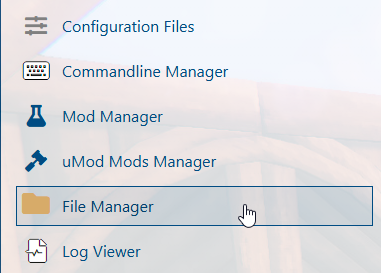
3. Navigate to the File Manager section.
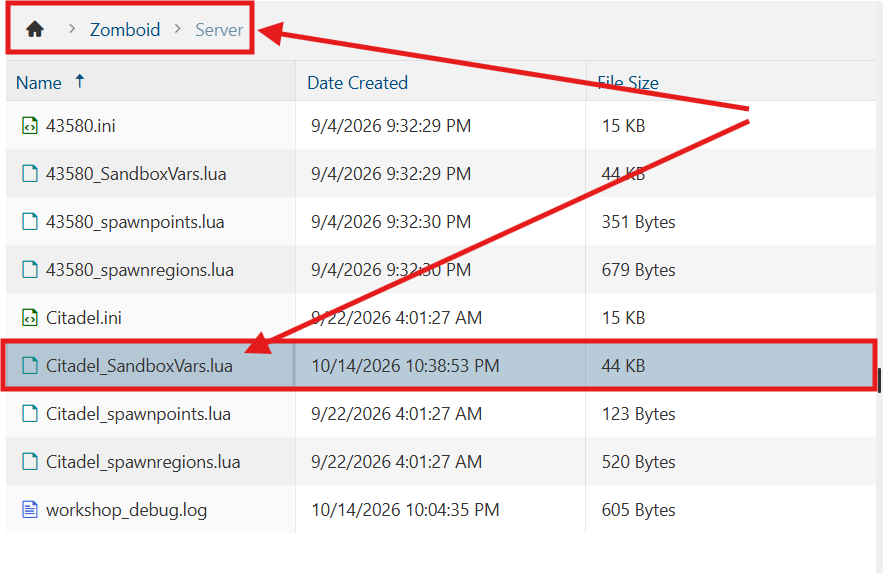
4. Navigate to the /Zomboid/Server directory and locate the [SaveName]_SandboxVars.lua file, replacing [SaveName] with the name of your server's save.
5. In the configuration file, locate the ZombieConfig section and find the PopulationMultiplier setting.
Change its value to your desired zombie population multiplier to adjust the overall zombie population on your server.

| Value | Zombie Count |
|---|---|
0 |
None |
0.35 |
Low |
1 |
Normal |
2 |
High |
3 |
Very High |
4 |
Insane |
6. After editing, click Save to apply the changes.

You can now start playing on your server.
Did the above information not work for you?
Please click here to contact our support via a ticket.