

This guide will show you how to Modify Hunger and Thirst Rates in the Soulmask Server
Looking to rent a Soulmask server? Click here to order your server now!
Managing hunger and thirst rates on your Soulmask server is essential for shaping the survival experience you want your players to have. These settings determine how quickly characters consume food and water, directly influencing exploration, combat pacing, and overall difficulty. By adjusting the survival needs settings, you can create anything from a relaxed, exploration‑focused world to a harsh environment where resource management becomes a core challenge. This guide walks you through how to modify these values so you can fine‑tune the balance, intensity, and feel of your server’s survival mechanics.
Customizing Survival Needs on Your Soulmask Server
1. Connect to your Soulmask server
2. Log in as an admin. Learn how to do this here.

3. Open the Coefficient Settings menu.

4. Head to the Consumption tab to continue.
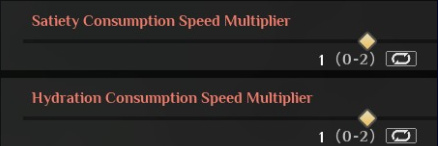
(NOTE: Each option functions as a multiplier: 0 disables the effect, and 0.5 applies it at 50% of the default rate.)
5. Set the Satiety and Hydration Consumption Speed Multipliers to match the pacing you want for your server.
6. Set the decay Time Multiplier to adjust the lifespan of food items.

Please click here to contact our support via a ticket.